A few years ago, the idea of typing a sentence and getting a full video out of it would have sounded like something out of a science fiction film. But today, it is something anyone can try in a browser.
You describe a scene, upload an image, or paste a short script, and within minutes, you have moving visuals, voices, camera motion, and sometimes even realistic people speaking. That magic feeling is exactly why AI video generators have exploded in popularity.
Creators use them for YouTube, ads, social media, education, and even storytelling. Businesses use them to save time and cut production costs. But behind the scenes, there is nothing magical going on. It is a mix of smart math, huge datasets, and models trained to understand how the world looks and moves.
To really understand how AI video generators work, it helps to break the process step by step. From text and images to motion, every part has a clear role.
The Foundation: Teaching AI How the World Looks and Moves
Before an AI video generator can create anything useful, it first needs to even understand what a video actually is.
To do that, developers train the AI system behind the tool using huge amounts of video and image data. This system, often called a model, learns by studying millions of examples of how things look and move over time. These datasets show the AI things like:
- The appearance of objects from different angles
- How people walk, talk, blink, and gesture
- How light, shadows, and depth behave
- How motion flows from one frame to the next
Instead of memorizing individual videos, the model understands patterns. It learns that when someone lifts their arm, the shoulder moves first, then the elbow, then the wrist. It learns that a car driving forward gets slightly bigger in the frame. It also learns that water ripples instead of moving in straight lines.
This learning phase is slow and expensive, but it shapes everything the AI can and cannot do later.
Understanding Text Prompts: Turning Words Into Meaning
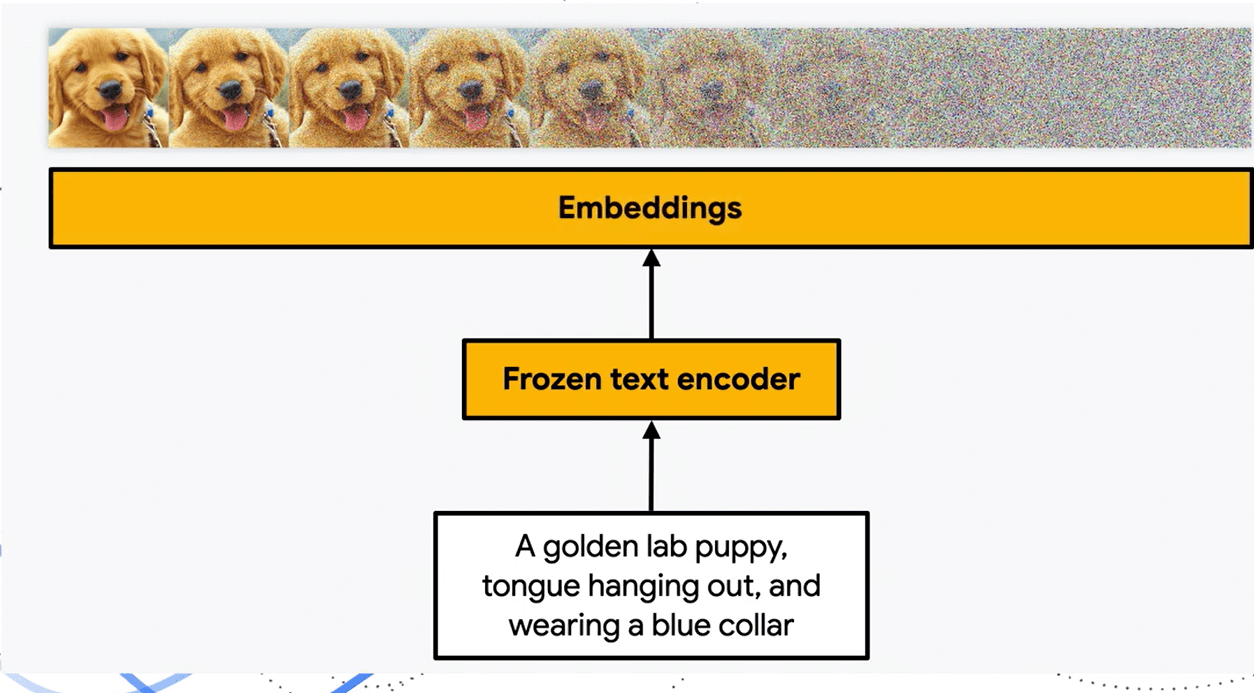
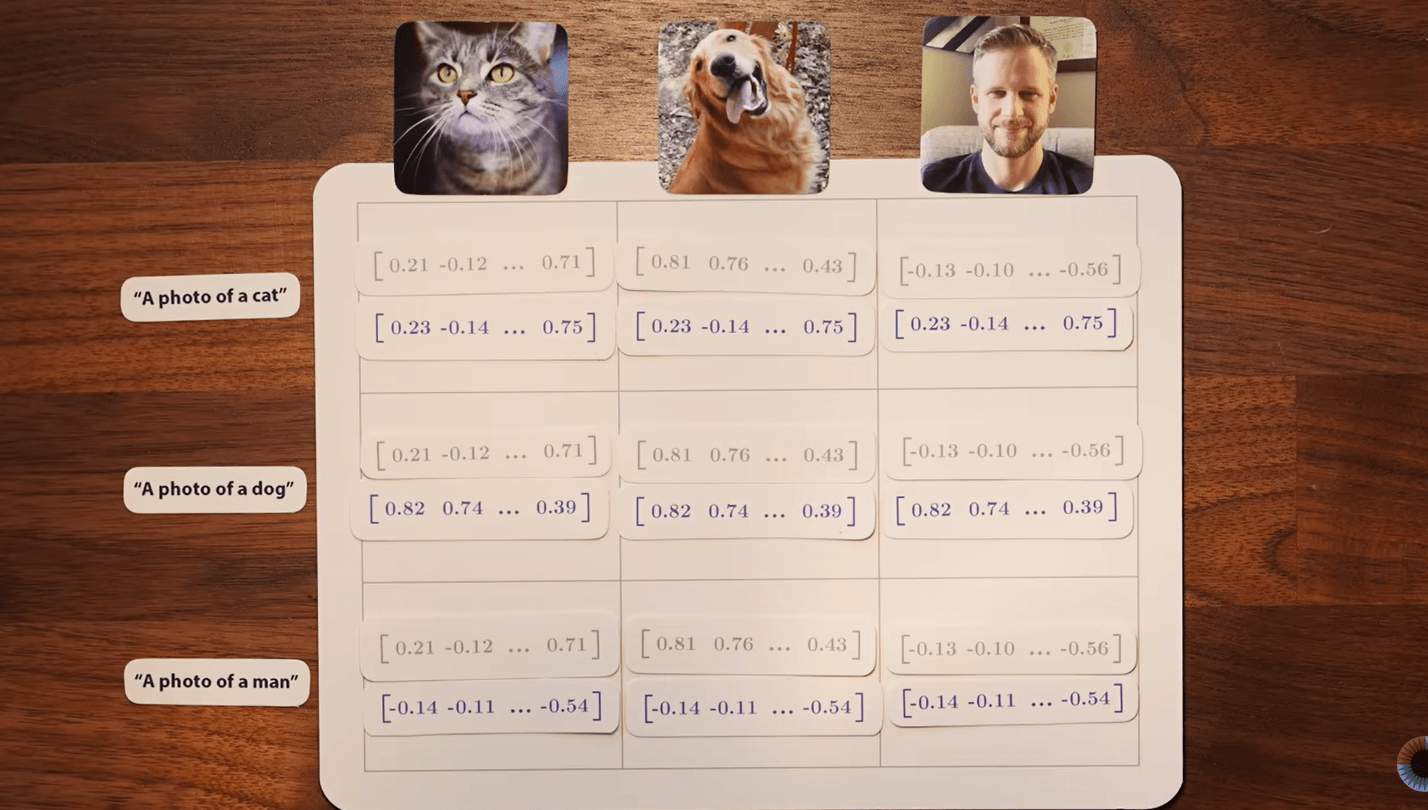
When you type a prompt like “a cat running through a sunny garden,” the AI does not see it as a sentence the way you do. The words in the prompts initially go through a language model that converts words into numerical representations called embeddings. These embeddings capture meaning, not just spelling. For example, the model knows that “dog” and “puppy” are related, and that “running” implies motion, speed, and direction.
At this stage, the AI breaks the words you provide into individual concepts such as:
- Subject: cat
- Activity: running
- Surrounding: garden
- Mood or lighting: sunny
These concepts then become instructions that the video model can work with. The clearer and more specific the prompt, the better the instructions.
This is why vague prompts often lead to strange results. The AI is not confused; it is just filling in gaps with its best guess.
From Still Images to Moving Scenes
Some AI video generators begin with images instead of text. Others let you combine both.
If you upload an image, the AI first analyzes it to understand what is inside. It identifies objects, people, backgrounds, depth, and perspective. It figures out what is in the foreground and what is in the background.
Once that understanding is in place, the model predicts how the scene could move over time. This is where things get interesting.
The AI does not simply slide pixels around. It generates new frames based on learned movement sequences. For example:
- A person’s head might tilt slightly as they speak.
- Hair might sway with subtle movement.
- Clouds may drift slowly across the sky.
Each new frame is generated in relation to the previous one, giving the impression of smooth motion.
The Role of Diffusion Models in Video Creation
Many modern AI video generators rely on diffusion models. These are the same types of models used in popular AI image generators.
The basic idea is simple to explain, even though the math behind it is complex.
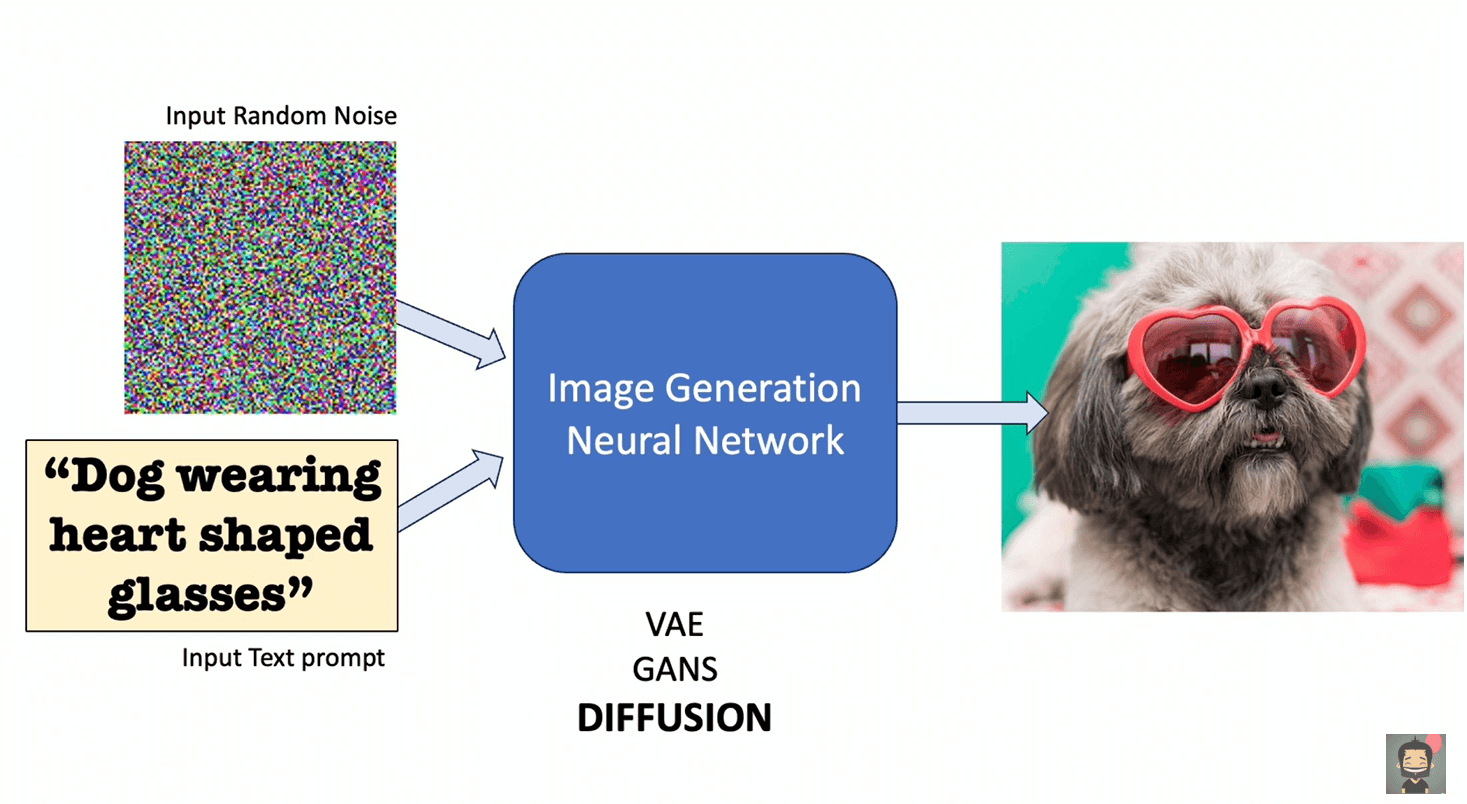
A diffusion model learns how to remove noise from data. During training, the model sees images and videos that have been gradually filled with random noise. It learns how to reverse that process, step by step, until the original image or video is clear again.
When generating a video, the process works in reverse:
- The model starts with random noise.
- It applies the phrase you provide or the image as guidance.
- Frame by frame, the noise is refined into meaningful visuals.
For video, the model also has to keep frames consistent with each other. This is one of the hardest parts. If consistency is not handled well, you get flickering, warped faces, or objects that suddenly change shape.
Better video models use further conditions to make sure motion looks realistic and stable.
How Motion Is Predicted Between Frames
A video isn’t merely a stack of images. It is a timeline. AI video generators predict how each frame should change based on the frames before it. This is called frame-to-frame continuity.
To achieve this, models use techniques that track:
- Object positions
- Movement direction and speed
- Changes in lighting and shadows
If a ball is rolling to the right, the AI knows it should continue moving in that direction unless something stops it. If a character is talking, the mouth movements need to correspond to the rhythm of speech.
This is why longer videos are much harder to generate than short clips. Small errors can build up over time, making motion look unnatural.
Adding Camera Movement and Perspective
Another impressive feature of AI video generators is simulated camera motion.
Your prompt can contain things like “slow pan,” “zoom in,” or “cinematic angle,” and the AI tries to replicate those effects. It does this by adjusting perspective, depth, and framing throughout frames.
The model has learned what camera movements look like from real footage. It knows that a zoom changes object size without changing position, while a pan shifts the entire scene sideways.
This gives AI-generated videos a more polished, film-like feel, even though there is no physical camera involved.
Talking Avatars: How Faces Learn to Speak
One of the most popular uses of AI video generators is talking avatars. These are the videos where a digital person looks into the camera and speaks clearly, often reading a script you typed. This works by combining several models, each handling a different job.
First, the phrase you write is converted into speech using a text-to-speech system. Modern systems do not just read words. They understand pacing, emphasis, and intonation. That is why AI voices today sound far more natural than the robotic voices from years ago.
Next comes the visual part. The video model already knows what human faces look like in motion. It has learned how lips move when certain sounds are made, how cheeks tilt gently, and how the jaw opens and closes.
The AI aligns the generated voice with facial movement. This is called lip synchronization. The timing has to be precise. Even small variations between audio and mouth movement can break the illusion instantly.
More advanced systems even add subtle head nods, eye blinks, and micro-expressions. These details make the video not feel stiff and unnatural.
Where the Voice Really Comes From
The voice in an AI-generated video is not random. Text-to-speech models are trained on hours of human speech. They learn how sounds blend together, how sentences rise and fall, and how emotion changes delivery.
Some tools even allow voice cloning. In those cases, the AI system analyzes a real person’s voice and learns its patterns. Pitch, speed, pauses, and inflection are all captured. This is why cloned voices can sound surprisingly close to the original.
Once the audio is generated, it becomes the backbone of the video timeline. Everything else, facial movement, gestures, even pauses, is synced around that audio track.
Why Short Clips Look Better Than Long Videos
If you have experimented with AI video tools, you may have noticed something. Short clips often look impressive, while longer videos start to fall apart. That’s because AI video generators are very good at predicting motion over short time spans.
A few seconds can still come out well. But as the time increases, errors also add up. A small inconsistency in frame 20 can turn into a noticeable distortion by frame 200.
That is why many tools limit video length or recommend generating content in segments. It is not a marketing trick. It is a technical limitation.
Developers are actively working on finding a solution to this problem, but for now, shorter videos are easier to control and polish.
What AI Video Generators Are Actually Good At
Despite the hype, AI video generators are not replacing film crews anytime soon. But they are extremely good at specific tasks.
They shine when it comes to:
- Explainer videos
- Social media clips
- Marketing content
- Training and educational material
- Concept visuals and storyboarding
They make it easier for people to create videos without needing a lot of experience or equipment. Someone with no camera, no lighting, and no editing background can still produce usable video content.
What They Still Cannot Do Well
There are also clear limits. AI still struggles with:
- Long, sophisticated narratives
- Highly emotional acting
- Exact physical interactions
- Perfect realism throughout extended scenes
Human reasoning, storytelling, and intentional performance are still hard to replicate. AI can imitate patterns, but it does not truly understand meaning or emotion the way people do.
For now, the best results come from using AI as a tool and not a replacement.
Wrapping Up: From Input to Motion
When you step back and look at the whole process, AI video generation becomes easier to understand.
You give the tool something to start with. That might be a short piece of text, an image, or a voice. From there, it figures out what should happen next, then what should happen after that, and keeps going until it forms a video.
Nothing is being recorded. The movement you see is the tool making educated guesses, one frame at a time, based on what it has seen during training. And then, the result feels almost unreal.
Compared to how video used to be made, turning an idea into something watchable is now far easier than it used to be.